


GrabIt - Adding servers
Page 3/7 of this article
We now have to setup our newsserver, for example the server of your ISP or a payserver. In GrabIt’s main screen we see a field on the left with ‘My GrabIt’ and ‘Default Server’. To connect to our own newsserver, we have to change some settings. Right click on Default Server and select Server properties.
If the Default Server does not exist yet, simply right click My GrabIt and select Add server.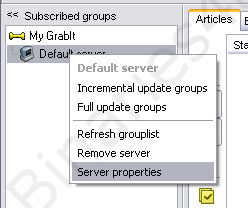
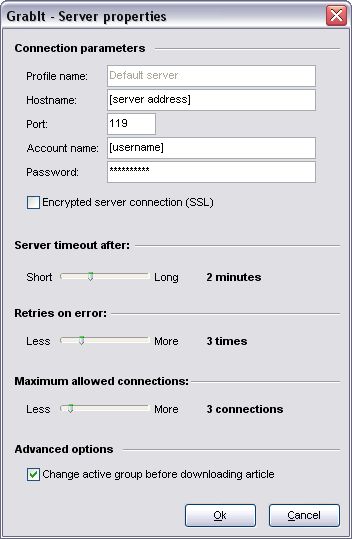
A screen called GrabIt – Server properties pops up and allows us to change the settings for our own newsserver.
- Profile Name : Give your server a name. In the case of the default server, you will see that the only option is ‘Default Server’.
- Hostname : In this field you have to enter your server address. This address may be provided by your Internet Service Provider or can be a payserver.
- Port: Does not have to be changed. Port 119 is standard but some payservers allow you to use some other ports as well.
- Account name & Password : If your server requires authentication, you may have to enter your username and password here. My server does not, so I leave them blank.
- Encrypted server connection (SSL): if you use a server that allows you to use SSL (encrypted data traffic) then you can check this box. Keep in mind that for SSL usually a different port than 119 has to be chosen.
- Server timeout after : If connecting to a server takes a long time, GrabIt will time out. (If auto retry items in batch from the previous chapter is checked, GrabIt will retry the failed files.)
- Retries on errors : How many times GrabIt retries failed items.
- Maximum allowed connections : The maximum number of simultaneous connections GrabIt can make with your server. This number may be different if you use a different server. If you get ‘too many connections’ errors, then decrease this value.
 For example: are you using premium payserver UsenetServer, then enter hostname 'secure.Usenetserver.com', use port 563 and activate SSL encryption. Your UsenetServer username and password have to be filled in.
Adding extra servers:
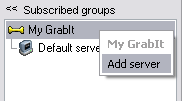
Adding an extra server is very easy. Simply right click on My GrabIt located on the left and choose Add Server. Settings are changed in the same way as above.
To the next chapter:  Downloading using NZB files