


FTD - Spots: advanced functionality
Page 4/6 of this article
This chapter continues on the topic of 'spots'. Make sure you know how to view spots, which was explained in the previous chapter, before continuing. This chapter consists of the following sections:
Give away kudos
Kudos are some sort of fictive coins/cookies/candy etc. You can give them away to show your appreciation to the spotter for spotting something. So it is a way to say: 'thank you'. Of course adding a message is also a nice gesture to show your appreciation.
To give away kudos press the 'kudos weggeven' (give away kudos) button at the bottom of a certain spot.
A window appears where we can give away some kudos.
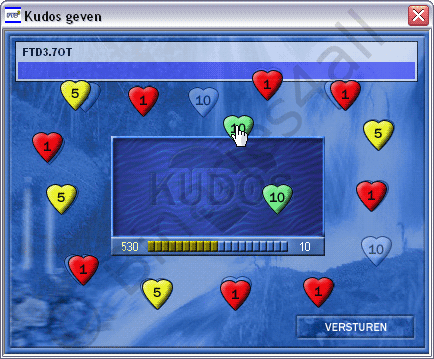
As you can see the spot and spotter are displayed in the upper left-hand corner of the screen. Drag the desired amount of kudos to the center of the window and click on 'Versturen' (send). Now the amount of kudos that you donated will be shown next to any messages you added to the spot.

FTD mail
FTD provides a way for users to communicate with each other, called 'FTD Mail'. Open FTD mail by clicking on the 'Mail' button.

The FTD mail module starts:
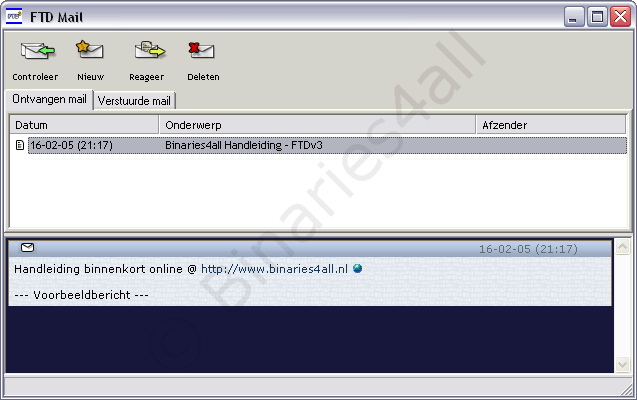
As you can see my mailbox contains one message. On top we see several buttons and two tabs: 'Ontvangen mail' means received mail and 'Verzonden mail' means sent mail. If you click on a message it will be opened. You can reply by clicking on the 'Reageer' (reply) button. And the 'Nieuw' (new) button lets you write a new message.
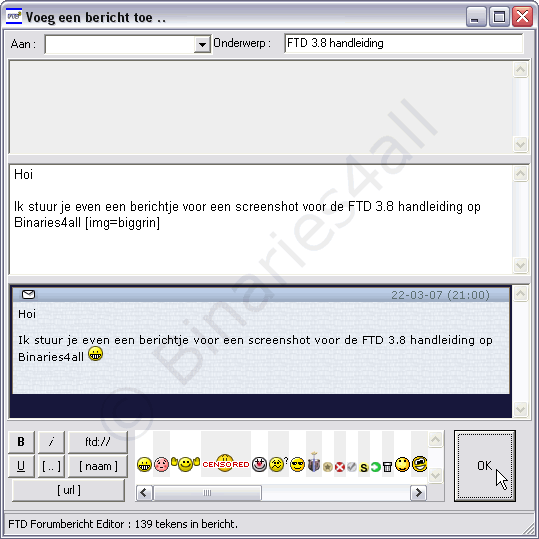
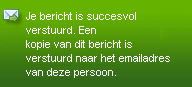
A new window appears with 'Aan' (to) and 'Onderwerp' (subject) fields. In the middle we can write our reply. If you deselect 'Zichtbaar' (visible) the preview area will be hidden. Click on 'OK' to send the message. We will get an alert message if the message was sent successfully. You can view your message again at the tab 'Verstuurde mail' (sent mail).\
To the next chapter:  Adding new spots